The SceneGraph3D Description Language
world
| Derived from: |
Group3D |
| Class name: |
World3D |
| Placement: |
Topmost tag. Can only be one in each scene file. |
| Description: |
The topmost tag of the XML scene file. It must be unique as it represents the root of the whole scene graph. It provides global attributes and operations, such as the reset message and contains every other node. |
| Special notes: |
The world node has a predefined name: %world, which cannot be overriden. |
| Inherited attributes: |
visible, active |
| New attributes: |
| attribute |
type |
description |
| ambient_occlusion |
OPTION
no
none
ssao |
Set the method for calculating the ambient illumination of the scene. Currently, two options are available, no or none,
which uses the unmodulated global ambient component and ssao, which calculates screen-space ambient occlusion
based on the split-horizon algorithm. Note that you have to expect a severe slowdown when activating this type of global
illumination effect. Default value is none/no. |
| ambient |
VEC3 |
The global ambient color. If the ambient_occlusion method is set to none, ambient is additively blended with the direct illumination. Otherwise, it is first modulated by the ambient occlusion term. Default is (0.2,0.2,0.2). |
| background |
VEC3 |
The background color. |
| ao_radius |
FLOAT |
The range of effect of ambient occlusion. The algorithm searches for occlusion up to ao_radius world units away from the current fragment. Default is 1. |
| bloom |
BOOLEAN |
Turns on or off the bloom effect. Default is off. |
| defocus |
BOOLEAN |
Turns on and off the depth of field defocusing effect. The parameters associated with the effect are attributes of the camera node, as different cameras may have different lens specifications. Default is off. |
| shadows |
OPTION
simple
quad
disk
slope |
Defines the method for the shadow map sampling. Three different modes are supported for sampling the shadow maps so far, nearest neighbor, 2X2 multisampling with percentage closer filtering (PCF), 16-tap disk sampling PCF and 16-tap PCF with variable bias. The corresponding option values are: simple, quad, disk and slope.The sampling mode is the same for all shadow maps. Soft shadows are produced with all modes except the nearest neighbor sampling, when the light radious is greater than zero. The size of the light source determines the fuzziness of the penumbra. realistic penumbrae are produced by taking into account the distance to the occluder in order to calculate the shadow spread factor. Default is simple. Note that shadow test are also used for internal calculations such as the volumetric lights. Unless specified otherwise, simple (single-sample) shadows are used in these cases for efficiency. |
| hdr_mode |
OPTION
manual
auto
|
Specifies the tone mapping color adjustment calculations. Manual mode (default) uses the key and white point values explicitely supplied by the user. Automatic mode calculates the mean intensity of the image and compensates the luminance according to the range defined by the white point. The automatic tone mapping dynamically enhances the intensity range, so images dominated by dark regions are amplified whereas overly bright frames are subdued. |
| hdr_key |
FLOAT |
The "expected" intensity (same scale as the light intensity units) of the scene. This parameter is used with the tone mapping. |
| hdr_white |
VEC3 |
Specifies the reference white point of the image. Used in the tone mapping operation. Note that this is a regular RGB value. Different white point values for each channel can alter the hue of the image for dramatic effects. |
| fog_active |
BOOLEAN |
Enables the fog. To use the fog, the skylight model must be activated. |
| fog_color |
VEC3 |
Fog color |
| fog_alpha |
FLOAT |
Fog opacity at maximum distance |
| fog_distance |
FLOAT |
Distance from the camera at which the fog is thicker |
| debug |
BOOLEAN |
Activates the debug (verbose visualization) mode for this node hierarchy. |
|
| Events: |
| event name |
condition |
| init |
When the scene graph is ready to run, after the init procedure has finished. |
|
| Inherited events: |
- |
| New messages: |
| attribute |
value |
description |
| reset |
- |
Resets the whole scene graph to its initial state. This includes all changes made to the hierarchy and internal node states. |
| ambient |
VEC3 |
Set the current global ambient color. |
| bloom |
BOOLEAN |
Turns on or off the bloom effect. |
| defocus |
BOOLEAN |
Turns on and off the depth of field defocusing effect. |
|
| Inherited messages: |
enable, disable, activate, deactivate, hide, show, visible, active |
| Redefined messages: |
- |
| Obsolete messages: |
- |
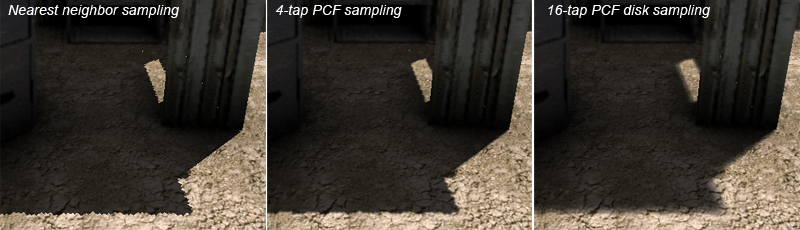
Results from applying three different types of shadow map sampling to the same scene.
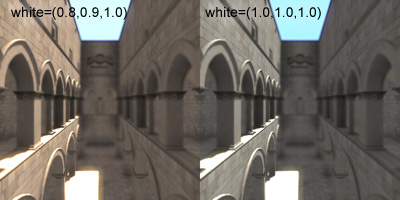 Changing the image tint by setting the white point.
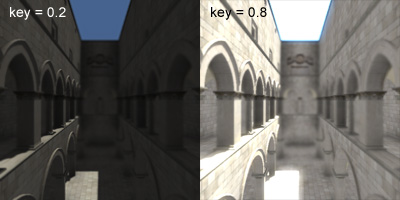 Impact of different key values (white point at (1,1,1) ).
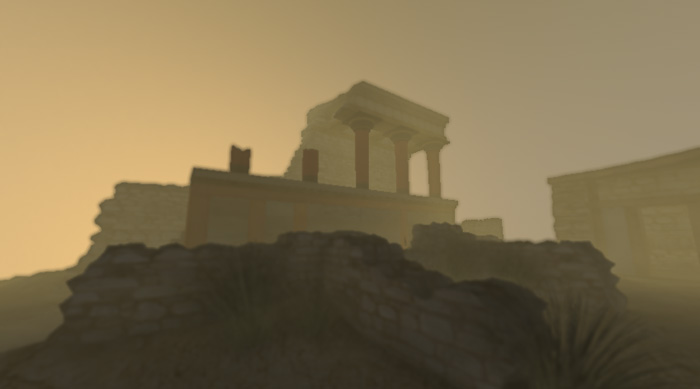
Sky light model combined with fog.
Example
<world ambient="0.3 0.3 0.3" defocus="no" shadows="disk">

    <transformation name="environment" scale="1.0,1.0,1.0" translation="0,0,-10">

        <object name="geom2" file="arena.obj"></object>

    </transformation>

    <object name="geom1" file="fighter.obj"></object>

</world>
|
Last update: 24 Feb. 2010