The SceneGraph3D Description Language
| Home | About EaZD | Deferred renderer API | SceneGraph3D API | SceneGraph3D scene description language |
Index| Scene file structure | camera | character | directory | eventmessage | group | input | light | linearmotion | material | node | object | proximitytrigger | skylight | spinner | surface | transformation | user | world | |
object
| Derived from: | Node3D | ||||||
| Class name: | Geometry3D | ||||||
| Placement: | Anywhere | ||||||
| Description: | The object scene graph node loads and displays a mesh from an external file in one of the supported formats. Currently only the Alias Wavefront Object format is supperted (.obj and corresponding .mtl). All known bitmap formats are supported for textures. | ||||||
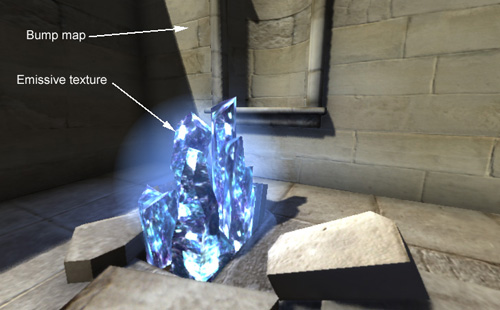
| Special notes: | In addition to the regular color texture specified in a OBJ format material (in the .mtl file), the engine now supports the loading of secondary color layer, emission, bump and specular maps as part of the material description. Therefore, you can modify the mtl files to include declarations for these (3DS Max exports most of them ny default): map_kd2 [SECOND COLOR LAYER MAP (RGBA)] map_ke [EMISISON MAP] map_bump [BUMP MAP (Grayscale)]. 255=high, 0=low. map_ks [SPECULAR MAP (RGBA)]. RGB encodes the specular color and A the exponent |
||||||
| Inherited attributes: | name, active, visible | ||||||
| New attributes: |
|
||||||
| Events: |
|
||||||
| Inherited events: | - | ||||||
| New messages: |
|
||||||
| Inherited messages: | active, visible, hide, show, deactivate, enable, activate, disable | ||||||
| Redefined messages: | - | ||||||
| Obsolete messages: | - |
Example
<world ambient_occlusion="ssao" bloom="yes" shadows="disk" ao_radius="6" ambient="0.3 0.3 0.3" defocus="yes"> <camera name="first_person" apperture="50.0" focal_distance ="30.0" focal_range="30.0" near="2.0" far="1000" follow="Myself" primary="true"> </camera> <transformation name="environment" scale="1.0,1.0,1.0" translation="0,0,-10"> <object name="geom2" file="arena.obj"></object> </transformation> <user name="Myself" control="navigate" speed="2.0" turn="0.5" position="0,10,100" lookat="0,10,0" input="Console"> </user> <input name="Console" type="mousekeyboard"> </input> </world> |
Last update: 24 Feb. 2010