About EaZD
| Home | About EaZD | Deferred renderer API | SceneGraph3D API | SceneGraph3D scene description language |
Introduction
EaZD is a deferred renderer that was initially implemented as a research platform for testing various real-time algorithms for shading and illumination effects using OpenGL. As it ended up as a pretty self-contained piece of software, it was decided that it could be made available on-line for any interested computer graphics developer. The source code is free but in case you find it useful or use parts or the whole of the library in any kind of project or product, please acknowledge the original source and the author.
The library is split in two parts, the core renderer API and a scene graph that takes advantage of the capabilities of the deferred renderer and its effects. However, the deferred renderer can be used separately by passing only two callbacks to a rendering and a camera setup function respectively, or in conjunction with the scene graph (SceneGraph3D). Please bear in mind that neither the specifications nor the implementation of the scene graph are yet complete, but feel free to build on top of the main classes any other type of functionality. The current capabilities and support for file formats are quite limited at the moment, but the scene graph will be subject to constant development in the next months.
The library is accompanied by a set of examples and a simple scene graph viewer that demonstrate the use of the APIs and the correct order of initialization of its elements.
What's New in Version 0.21
Deferred renderer:
- Tone mapping (auto/manual - see world node)
- Volumetric sun light (see skylight node)
- Sky model (see skylight node)
- Fog (see world node)
- Improved post-processing filters
- Speed enhancements and bug fixes
- Geometry bins (see geometry and API notes)
- Generic built-in particle renderer for view-aligned textured and depth-blended particles (see API section)
- Normal, specular and emission mapping (see geometry node)
Scene graph:
- Support for character animation (see character node)
- Joystick support (multiple devices - see input node)
- Mathematical primitives (surface node)
- New motion control nodes (see spinner and linearmotion nodes)
- Glowing lights (using the particle renderer - see light node)
- Support of emission, normal and specular textures in Geometry node (obj loader)
Requirements
EaZD relies on OpenGL 2.0 or higher for rendering and requires full support of the GLSL shading language specification (this means that on some ATI cards it will not work). Furthermore, more that 8 addressable samplers are required, so you are probably going to need a decent shader model 3 graphics card. The scene graph uses Direct Input for device input, so a version of the corresponding DirectX SDK should be present on your PC if you are compiling the lib. The scene files are also in XML format, which is supported in the library via the libXML 2.0. Binaries for all related libs are provided separately, for your convenience.
The Deferred Renderer
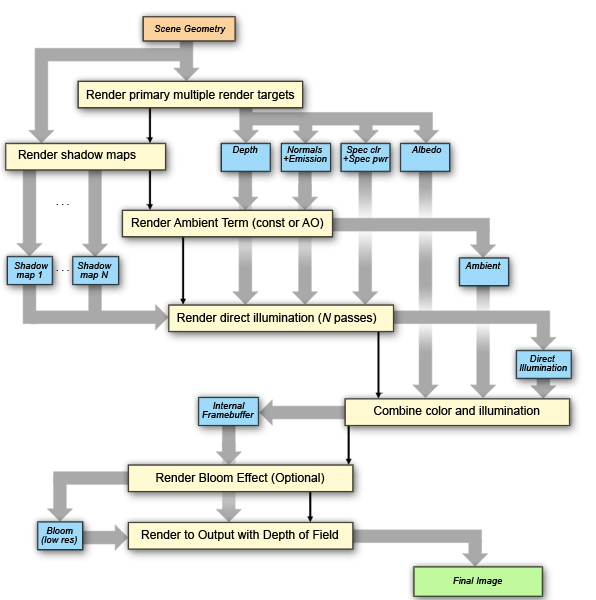
In deferred rendering, the generation of fragments from the raw geometric data being rasterized is decoupled from the lighting and color calculations of the final image fragments. To this end, all raw data that are necessary for the calculations are recorded in a set of primary buffers by using the technique of rendering to multiple targets. Then, all calculations are performed in screen space, disassociating the scene complexity from the image generation processing time.
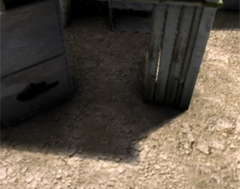
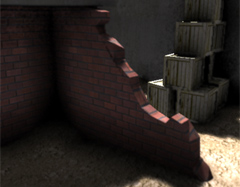
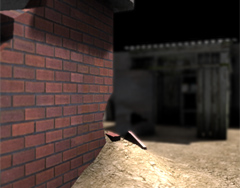
EaZD renderer supports the following features:
|
 |
The data flow diagram of the various stages of the deferred renderer are presented in the following schematic:
SceneGraph3D
SceneGraph3D is an extensible library for scene graph support that is integrated with the deferred renderer. The scene description is provided as an XML file (multiple file loading and unloading will be made available later). The scene description schema provides declarations for basic elements such as geometry, transformations and groups, but also an event-driven message passing mechanism to trigger functions and alter states and properties of nodes at run time.
One feature central to the design of the particular scene graph is the disassociation of the of the user, the camera and the input control entities. In fact, an arbitrary number of users, cameras and input control nodes can populate a scene, each one connected to the others in any combination. This provides an easy way to model a multi-user environment, where the user entities can be controller by humans (via input device nodes) or automata, which can be controlled by a behavioral animation controller. Switching among these options is simply done by assigning a different controller to each user on the fly with the corresponding message. The same mechanism goes for the camera nodes as well, which can follow any node or be left standing alone.
Almost every node type in the scene graph triggers events, which signify a change in its state. For instance, a proximity trigger produces an enter and an exit event when at least one of a number of predefined nodes enters or leaves its area of effect respectively and the root of the scene graph (the "world") triggers an init event when the world is parsed and ready for display. In order to use the occuring events for dynamically altering the behavior or state of the scene, SceneGraph3D supports event messages. The corresponding <eventmessage> XML tag can be placed inside any other node declaration and provides the association between an event type, another named node, which is going to receive the message (the recipient) and the command message to deliver. Messages contain instructions or attributes for redefining the look or behavior of the target node. For instance, the message text for a light source could contain the command "color 1.0, 0.95, 0.8" that changes the light color to the given rgb values. Multiple messages can be issued to a node by repeating the assignment of an event type to a new message.
To access a node for posting a message or using it as an attribute to another node (common when "attaching" a node to another, as is the case with the camera) one must reference the node by its name. Naming the nodes in the XML scene file is optional, but this is the only case where a unique name is required in order for the scene graph to be able to identify the target node correctly. A special name is reserved for the root of the scene graph, namely the "%world". Names, node types and attributes are all case sensitive.
For a complete list of supported node types, their attributes, events and messages that are recognised, please refer to the SceneGraph3D reference document.
Georgios Papaioannou, 21 Feb. 2010